
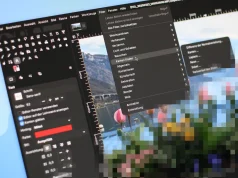
Eines der beliebtesten Argumente gegen die Verwendung von Gimp ist der Umstand, dass Gimp für jede Toolbox sowie für jedes geöffnete Bild ein eigenes Fenster öffnet. Was auf einem Arbeitsplatz mit mehreren Monitoren nützlich, wenn nicht sogar eine Notwenigkeit darstellt, ist auf nur einem Bildschirm manchmal hinderlich. Nicht selten werden die Menüs des Bildfensters von den Toolbars verdeckt. Dies wissen auch die GIMP-Entwickler schon länger, doch eine komplett überarbeitete Oberfläche soll erst mit der nächsten „großen“ Gimp-Version kommen. Von daher war ich recht überrascht über GimpBox zu stolpern. Mit diesem kleinen Programm könnt Ihr schon heute Gimp in nur ein Fenster verbannen.
GimpBox ist kein „neuer“ Gimp und auch kein Fork so wie das mittlerweile verwaiste GIMPshop. GimpBox ist lediglich ein Python-Skript, das als Wrapper für Gimp die einzelnen Fenster in ein Einziges kombiniert. Daher muss auch nichts groß installiert werden. In meinem Test hat das Skript unter Lucid und Maverick funktioniert. Ich vermute, dass das Skript unter jedem Linux funktionieren wird.

Zur Installation könnt Ihr das Skript nach bspw. /usr/local/bin herunterladen und dem Skript erlauben ausgeführt zu werden. Mehr ist eigentlich nicht zu tun. Pakete oder gar Paketquellen gibt es nicht, und werden eigentlich auch nicht gebraucht.
$ sudo apt-get install python-wnck (Ist bei Ubuntu installiert, bei Kubuntu wohl nicht)
$ sudo wget http://gimpbox.googlecode.com/hg/gimpbox.py -O /usr/local/bin/gimpbox
$ sudo chmod +x /usr/local/bin/gimpbox
Danach könnt ihr GimpBox über $ gimpbox starten. Optional könnt Ihr noch das Startmenü anpassen, so müsst Ihr nicht das Terminal bemühen um Gimp aka GimpBox zu starten. Ihr müsst dazu das Kommando für Gimp einfach nur von „gimp“ in „gimpbox“ ändern.
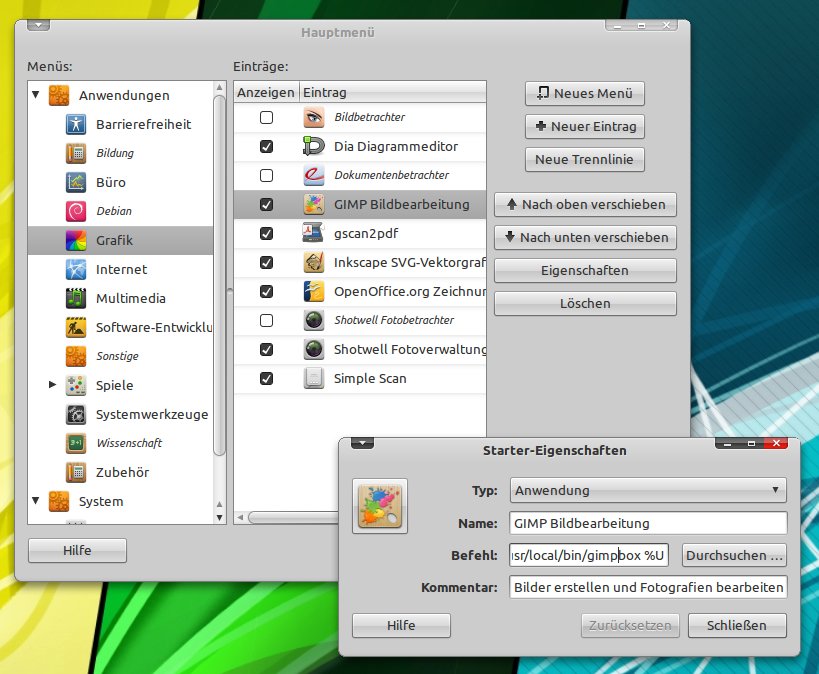
Allerdings konnten bei mir durch die Änderungen Bilder nicht mehr via Nautilus und „Öffnen mit… -> Gimp“ geladen werden. Es startet zwar GimpBox, doch das Bild wird nicht geladen.



Tolle Sache. Leider funktioniert es bei mir nicht, Kubuntu Lucid. Es stürzt direkt nach dem Start ab.
Vielleicht solltest du noch erwähnen, dass python-wnck benötigt wird.
Könnte an KDE liegen, das Skript zieht immerhin GTK an…
…
import gtk, gobject
[…]
gtk.main()
vielen dank für den hinweis! klappt bei mir (ubuntu lucid) ganz toll. endlich, möchte ich fast sagen 🙂
Danke. Auf einem grossen Bildschirm wäre mir zwar die Multifenster-Variante lieber (glaube ich zumindest), auf dem Netbook scheint GimpBox die Arbeit aber dtl. zu vereinfachen, mal sehen wie es im Dauereinsatz läuft.
Super Tipp… Werd ich heute abend gleichmal testen!
Nette Idee – wenngleich man die Option im Optimalfall doch direkt in Gimp integrieren sollte oder hab ich jahrelange Grundsatzdiskussionen über diesen Punkt bis dato erfolgreich verdrängt/verpasst?
gruß
fidel
Wie geschrieben will man die GUI von Gimp komplett umbauen. Ideen dazu findest du unter http://gui.gimp.org/index.php/GIMP_UI_Redesign wie bspw. http://www.mmiworks.net/eng/publications/2009/09/gimp-single-mode.html Früher oder später gibt es einen ganz offiziellen „Ein-Fenster-Gimp“ (Mit der Option auf die alte GUI).
Coole Sache,
selbst auf einem großen Monitor ziehe ich diese Variante der mit den zig Fenstern vor.
Allerdings kann mit gimpbox nicht mehr per Drag&Drop die Bilder in das Programm ziehen. Es geht jetzt nur über den Öffnen-Dialog
Doch Drag&Drop von Bildern geht noch. Zieh sieh nicht ins „Bildfenster“, sondern auf die Werkzeugleiste. Siehe… Screenshot.
Stimmt, so klappt es. Dann ist ja alles ok 🙂
Danke!
Bei mir gehen damit die Tastenkürzel nicht. Z.B. kann ich dann kein Strg+Z mehr machen. Hat noch jemand das Problem?
Bei mir funktioniert auch kein Shortcut. Das ist natürlich sehr schlecht… 🙁
Mein chinesisch ist leider etwas eingerostet. Ich hoffe der Autor kann meinen Bugreport lesen 🙂
Nettes Skript. Damit funktioniert aber nicht mehr das Ausblenden der Dialogboxen (Werkzeugkasten etc.) per TAB. Das Bild ansich kann auch nicht gelöst werden, um es auf einen anderen Bildschirm zu ziehen. Naja… jetzt hat man dann ein Fenster mit anderen Nachteilen. In Photoshop hab ich den Einfenstermodus und kann trotzdem mit TAB ausblenden und Bilder verschieben. Egal… als Skript auf jeden Fall nicht schlecht.
Hi,
die Beta von Gimp 2.7.1 ist bereits als DEB erhältlich und da habt ihr das native. Zudem kommen noch viel mehr tolle Features, wie ein verbesserte Texteingabe.
-p
Danke für den Tipp!
Ich habe es mir installiert und freue mich nun über den SIngle Windows Modus.
Allerdings konnte ich kein deb finden. Ich habe es nach dieser Anleitung (http://www.ubuntugeek.com/upgrade-your-gimp-version-to-2-7-in-ubuntu-karmicjaunty.html) aus einem ppa installiert.
Ich habe das Script ein bisschen umgebaut damit es
1. die Toolbox 2-spaltig anzeigt
2. bei Rechtsklick „öffnen mit Gimp“ richtig funktioniert
Dazu einfach:
Zeile 18:
import sys
Zeile 62:
self.hpaned1.set_position(58) #ursprünglich 180
Zeile 139:
os.popen(‚(sleep 0.5 ; gimp „‚+sys.argv[1]+'“ & ) &‘)
ändern
Hallo meles, funktioniert jedoch nur teilweise. Bei meinem Icon-Set (Faenza) bekomme ich nur eine Spalte an Tools angezeigt. Das „Öffnen mit“ klappt jetzt, allerdings geht beim Starten von GimpBox (ohne ein Bild) nur ein graues Fenster auf.
Hallo Christoph,
Ist mir auch gerade aufgefallen. Die Lösung:
Statt Zeile 139 folgendes einfügen:
if len(sys.argv)<2:
os.popen('(sleep 0.5 ; gimp & ) &')
else:
os.popen('(sleep 0.5 ; gimp "'+sys.argv[1]+'" & ) &')
Ich vermute du verwendest bei Gimp das Default-Theme. Dafür sollte statt 58 der Wert 68 reichen.
Hallo
bei mir unter Ubuntu 10.04 läuft das Prog leider nicht.Beim Start aus dem Terminal startet Gimp und stürzt sofort ab.Folgende Fehlermeldungen erhalte ich
** (gimpbox.py:7966): WARNING **: Trying to register gtype ‚WnckWindowState‘ as enum when in fact it is of type ‚GFlags‘
** (gimpbox.py:7966): WARNING **: Trying to register gtype ‚WnckWindowActions‘ as enum when in fact it is of type ‚GFlags‘
** (gimpbox.py:7966): WARNING **: Trying to register gtype ‚WnckWindowMoveResizeMask‘ as enum when in fact it is of type ‚GFlags‘
Hoffe mir kann geholfen werden.
Gruß…busfahrer
Welche Desktopumgebung läuft bei dir? GNOME? Hast du überprüft ob das Paket python-wnck installiert ist?
Hallo Christoph
Desktopumgebung ist Gnome und python-wnck ist installiert
dpkg -l | grep python-wnck
ii python-wnck 2.30.0-0ubuntu1 Python bindings for the WNCK library
Gruß…busfahrer
Hmmmm, vielleicht ist eine Gimp-Konfiguration dran schuld. Kannst du mal Gimp beenden und den versteckten Ordner ~/.gimp-2.6 umbenennen. Danach wieder GimpBox starten. Falls das auch nicht hilft, kannst du ja den Ordner wieder umbenennen.
funktioniert bei mir sehr eingeschränkt, wie bekomme ich das ding wieder weg? 😉
Lösche einfach die /usr/local/bin/gimpbox und ändere den Eintrag im Startmenü wieder auf „gimp %U“.
Hallo Christoph
leider ändert das umbenennen des Ordners ~/.gimp-2.6 nichts an dem Problem.
Gruß…busfahrer
Hallo Christoph
das scheint wohl ein Bug zu sein https://bugzilla.gnome.org/show_bug.cgi?id=630063
Gruß…busfahrer
Ist aber komisch, dass bei den einen GimpBox läuft, bei anderen mit einem ähnlichen Setup nicht. Aber der Issue könnte auf die Fehler passen.
DANKE!!!!
Super Sache! gibts sowas auch für xsane?
Gruß Fidel
Hi, nicht dass ich wüsste. Allerdings gibts mit Kooka und Simple Scan Alternativen, die deutlich aufgeräumter daherkommen (Allerdings aber auch weniger können…)
Schade ich werd mir mal Kooka anschauen, Simple Scan kenn ich ja als Ubuntuuser und das ist mir zu Simple.
Vielen Dank für die Antwort und für das tolle Blog!
Bei mir stürtzt das ganze ebenfalls nach dem Start sofort ab. (Lucid Lynx)
Wie kann ich das ganze deinstallieren?
Einfach /usr/local/bin/gimpbox löschen und – falls du das gemacht hast – den Eintrag im Startmenü wieder auf „gimp %U“ ändern. Danach sollte wieder alles beim alten sein.
Grüße
Christoph