
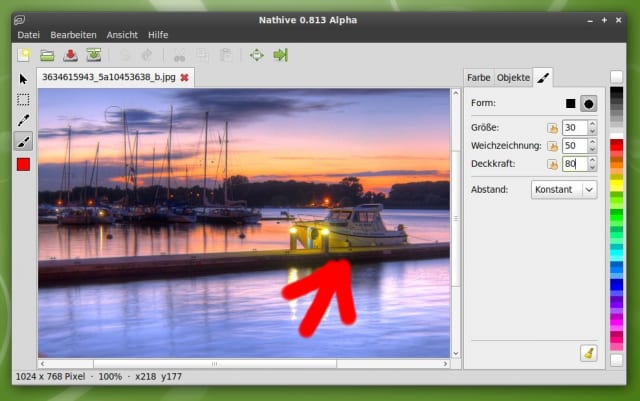
Eine Sache, die es unter Linux leider (oder präziser für GNOME) bislang gar nicht gibt, ist ein einfaches und modernes Bildbearbeitungsprogramm. Nichts gegen The GIMP, doch das Programm ist viel zu aufwändig für meinen Vater, der in einem Bild Tante Trudel und Onkel Rudi markieren möchte um Oma Liesbed zu zeigen, wer auf Opa Theodors Geburtstag war. Dafür braucht es nur einen farbigen Pinsel, ein Zuschneide-Werkzeug und vielleicht noch ein Textwerkzeug. Alles andere überfordert meinen Vater. Er will weder aufwändige Farbverläufe, noch Masken, noch Ebenen, noch Pipapo benutzen.
Unter Windows war er – viele werden lachen – mit MS Paint äußerst zufrieden. Ich stelle daher die trotzige Behauptung auf: Linux braucht ein (besseres) MS Paint als vorinstallierte Bildbearbeitung! Hoffentlich geht der Wunsch bald in Erfüllung, denn Nathive möchte ein leistungsfähiges und trotzdem einfach zu bedienendes Programm für die Bildbearbeitung werden. Programme wie Tux Paint, XPaint oder Kolorpaint erfüllen zwar ebenso den Anspruch einer „einfachen“ Bildbearbeitung, sind jedoch für Kinder ausgelegt, sehen unglaublich hässlich aus, oder sind für die falsche Desktopumgebung geschrieben worden 😉
Nathive ist ein sehr junges Projekt, das noch viel Arbeit vor sich hat. So fehlen der Bildbearbeitung noch viele wichtige Funktionen. Es fehlen weitere Pinsel, ein Auswahlwerkzeug, Füllwerkzeug, Undo/Redo-Funktionen und und und. Außerdem hat man gerade erst beschlossen, das Projekt vollständig umzukrempeln und von C auf Python umzusteigen. Wer das Programm jetzt schon testen möchte, der findet auf der Homepage des Projektes .deb Pakete für Debian-basierte Linuxe und .tar.gz Archive mit vorcompilierten Binaries.
Auf der Homepage findet sich auch ein unter CC by-nc-nd lizenziertes Video, das die bisherige Entwicklung gut dokumentiert. Sollte JavaScript deaktiviert sein, oder falls ihr kein Flash auf dem Rechner habt, so steht blip.tv auch eine .ogv-Variante des Videos zur Verfügung (Das Video gibt es leider nicht mehr). Nathive sucht aktiv nach Menschen, die sich beteiligen wollen. Ich bin mal gespannt, wann es eine erste Version gibt, die sich „Feature Complete“ nennen kann.
Ich fände es cool, wenn es Paint.net für Linux geben würde…
Ich auch
Ja genau sowas brauche ich für meine Freundin!
Ich selber kann auch noch nicht alles in GIMP umsetzten und meine Freundin nutzt lieber via VirtualBox ihr WindowXP-Paint LOL
Wir sind mit der Alfa schon recht zufrieden, mal sehen was da noch kommt (getestet Feundin: Ubuntu 8.10 und ich: Ubuntu 9.04)
Rene, an der Portierung von Paint.Net wird gearbeitet. Nennt sich Paint.Mono… Allerdings habe ich (und andere) es nicht geschafft das Ding zu compilieren.Siehe dieser Bug…
Ich könnte noch Gpaint empfehlen:
http://www.gnu.org/software/gpaint/
Die GUI erinnert doch sehr an MS Paint 😉
KolourPaint existiert (wie Du ja richtig angemerkt hast) und sollte genau diesen Bereich abdecken. Ja, es ist ein KDE-Programm und daher vielleicht aus div. Gründen keine Option für GNOMEler.
Allerdings solltest Du dann nicht postulieren „Linux braucht ein einfacheres MAlprogramm …“, sondern „GNOME braucht …“. Wäre imho passender.
Krita ist ein Fotobearbeitungsprogramm aber auch ein Malprogramm, welches ich sehr empfehlen kann.
Es ist zwar auch sehr komplex, dennoch übersichtlich und einfach in der Handhabung.
Unter Gnome wird noch das deutsche Sprachpaket „kde-i18n-de“ benötigt.
Mich überfordert Gimp auch zuweilen, und ich bin auf der Suche nach einem einfachen Malprogramm auf mtpaint gestossen. Das Programm wirkt etwas unkonventionell, ist aber schön klein, verwendet Gtk und erfordert sicher keine große Einarbeitungszeit.
http://mtpaint.sourceforge.net/
Was ganz gut zu diesem Thema passt: Genauso wie einige Paint vermissen, fehlt mir eine Art Wordpad unter Linux / im Gnome-Desktop, also ein Richtext-Editor. Ich hab zwar von Ted gehört, das ist jedoch unglaublich alt und basiert auf den Tcl-Bibliotheken (wenn ich mich nicht irre).
Wordpad war für mich ideal, um Texte schnell mit wenigen Formatierungs-Informationen anzureichern. OpenOffice ist zu groß, schwer, langsam und Abiword ist auch schon wieder zuviel des Guten. Einfache Editoren wie gedit, kate kommen eigentlich auch nicht in Frage.
Und so bin ich immer noch und ständig auf der Suche 🙂
Hallo Tilmann. mtPaint kenne ich auch, hatte ich vergessen zu erwähnen. Gehört jedoch für mich in die Klasse „zu hässlich“. Des weiteren ist mtPaint stark an einen Pixeleditor angelehnt. Ideal finde ich den Bildbearbeitungspart von Shutter. Wenn es diesen als eigenständiges Programm gäbe wäre ich schon fast happy 🙂
Hallo, Ich hab’s zwar nicht ausprobiert und hinsichtlich MS-Paint verglichen, aber im OpenOffice-Büropakte gibts doch auch ein „bildverarbeitendes“ Programm. Draw heisst es – was meint Ihr dazu?
Interessant, man darf gespannt sein wie sich Python langfristig auf die Performance auswirkt, wenn aus dem schnuckeligen Teil eine Monsterbildbearbeitung wird.
Schade, dass Vala noch nicht fertig ist, das wäre ein guter Kandidat gewesen.
Hi,
Ich hab‘ in der YALM-Ausgabe von Juni 09 gelesen, wie GIMP erweitert werden kann – coole Sache und das bringt mich auf die Idee: Kann GIMP nicht auch abgespeckt werden? So dass all das ‚professionelle‘ ausgeblendet ist und nur das erscheint, was nötig bzw. gewünscht ist.
Ich bin da nicht der Crack, ich habe bloss immer solche Phantasien 🙂
Ice
Vielleicht wäre dieses noch was für euch
http://kornelix.squarespace.com/fotoxx/
viel spass
@Tom, Fotox ist ganz nett, hat aber keine Pinsel, keine Textwerkzeuge. Eignet sich so nur zum Zuschneiden von Bildern und zum Verändern von Farben.
@Icq, Hatte Gimp auch schonmal abgespeckt. Aber die umfangreichen Menüs bleiben. Da müsste man schon mehr machen.
@Ypsi, Python muss ja nicht langsam sein. Für Grafikroutinen kann man ja auf fertige Bibliotheken zugreifen. Dafür muss man das Rad ja nicht nochmal in Python erfinden.
Vollkommen richtig, schade ist halt immer irgendwie der Ballast durch den Interpreter, bei einer Bildbearbeitung fällt das aber nicht mehr so ins Gewicht. Ich habe mich jetzt nicht eingelesen, für die GUI und den Programmfluss eignet sich Python sicher gut und für die eigentlichen Bearbeitungsfunktionen würde sich sicherlich sowas wie gegl anbieten.
http://gegl.org/
Ich werde das gespannt beobachten. 🙂
Ich verwende eigentlich nur shutter für Bildschirmfotos, es bietet gute Möglichkeiten das Foto zu bearbeiten was eigentlich aus reicht. Im Grunde brauche ich zusammen mit F-Spot kein Gimp mehr.
Danke für die tollen Tips! Ich stand gerade vor der Entscheidung, mir auf dem Netbook für ein paar kleine Bildmodifikationen den fetten Gimp zu installieren oder nach „ubuntu einfache bildbearbeitung“ zu googlen 😉