
Dropbox entwickelt sich wieder mal ein Stückchen weiter. Bislang konnten Clients Daten von Dropbox runter- bzw. hochladen. Ein direkter Datenaustausch zwischen den Rechnern, auch wenn sie im selben lokalen Netzwerk standen, war nicht möglich. Das ändert sich nun mit der ersten öffentlichen Beta aus der 0.7.x-Reihe des Dropbox-Clients. Daten können nun direkt über das lokale Netzwerk synchronisiert werden…
Bislang kommunizierten Rechner auf denen der Dropbox-Client installiert wurde ausschließlich über das Internet miteinander. Schob man auf RechnerA eine Datei in den Dropbox-Ordner, so lud Dropbox die Datei automatisch zu Dropbox hoch. Auf RechnerB wurde diese Datei dann wieder über das Internet von Dropbox heruntergeladen. Dies ändert sich mit der nächsten Dropbox-Version, die man schon jetzt als Beta ausprobieren kann.
RechnerA lädt die Datei natürlich immer noch zu Dropbox hoch, doch RechnerB, der den selben Dropbox-Account benutzt und im selben Netzwerk wie RechnerA steht, zieht die Datei direkt von RechnerA und nicht mehr aus dem Internet. Somit spart man sich Internet-Traffic und natürlich läuft die Synchronisierung der Daten von Rechner zu Rechner deutlich schneller.
Die neue Version bekommt man für Linux, Apple und natürlich auch Windows aus dem Dropbox-Forum, bitte beachtet das Dropbox diese Version als „Highly Experimental Build“ ansieht, seid also auf Fehler gefasst… Wer Dropbox bislang noch nicht installiert hat, der sollte zuerst Dropbox in der aktuellen offiziellen Version installieren, die „unstable“-Archive enthalten nur den Dropbox-Client und nicht das Nautilus-Plugin. Hat man das Archiv heruntergeladen, so sollte man Dropbox stoppen…
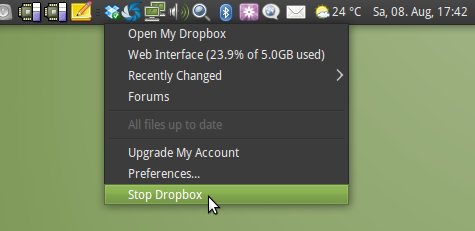
Danach kann man den alten Dropbox-Client löschen und die gerade heruntergeladene 0.7.x Version installieren. Liegt das .tar.gz Archiv beispielsweise auf dem Desktop, so muss man einfach nur die Befehle…
$ rm -rf ~/.dropbox-dist/
$ tar -xzf ~/Desktop/dropbox-lnx.*.tar.gz -C ~/
…ausführen. Anschließend kann man Dropbox wieder über Anwendungen -> Internet -> Dropbox aus dem Menü heraus starten. Am Programm selber hat sich nun nicht mehr viel geändert. Die P2P-Funktionalität taucht nirgendwo direkt auf. Man merkt sie beispielsweise, wenn man einen neuen Rechner zum eigenen Account hinzufügt und eine größere Menge an Daten transferiert wird. Ist ein weiterer Rechner mit diesem Account im LAN, dann trudeln die Daten mit mehreren MB/s ein…
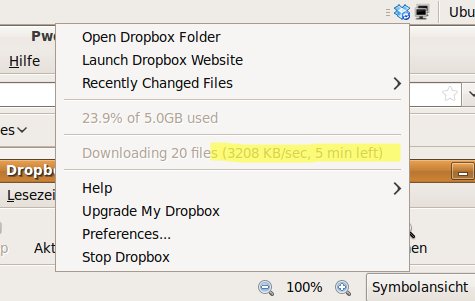
Man kann dies aus der Statusanzeige des Dropbox-Menüs erkennen. Wenn auf einmal Datenraten erzielt werden, die über den eigenen Internetzugang nicht möglich wären, dann klappt die Synchronisation von Rechner zu Rechner.



Kann man das auch so einstellen, dass die Daten nur über das LAN ausgetauscht werden?
Mich stört an Dropbox schon lange – weswegen ich das Programm auch nicht einsetze – dass es die Daten irgendwohin lädt, wo ich keine Kontrolle darüber habe. Eigentlich warte ich darauf, dass irgendwer mal eine freie Dropbox-Server-Implementation schreibt, die man auf seinem eigenen Server laufen lassen kann. Aber eine P2P-Funktionalität, die den Server höchstens noch dafür verwendet, dass die Rechner sich untereinander finden, wäre ja noch besser.
Tach otzenpunk, ja das ist ein Feature das viele Kunden von Dropbox – speziell Unternehmen – wünschen. Aber ich vermute, dass das nicht passieren wird. Dropbox müsste das Geschäftsmodell ja komplett umstellen, wenn sie dann noch weiter Geld verdienen möchten.
Thanks for the useful post.
Variante ohne Server in Übersee:
iFolder von Novell.com
synct files zwischen eigenem server und mehreren Maschinen
Christof
Dropbox kann man auch mit Verschlüsselung nutzen: Mit „EncFS“ auf dem lokalen Rechner ein verschlüsseltes Dateisystem im Dropbox-Verzeichnis anlegen und das Klartext-Gegenstück in einem lokalen Ornder, z.B.
encfs ~/Dropbox/.crypt ~/crypt
Damit ist der verschlüsselte Ordner in Dropbox unsichtbar – das soll nur vor versehentlichem Beschreiben schützen. Die zu verschlüsselnden (also Klartext-)Daten werden in ~/crypt abgelegt und vom lokalen „encfs“ verschlüsselt nach ~/Dropbox/.crypt geschrieben. Dropbox merkt das und synct wie gewohnt. Auf den anderen Rechnern, mit denen man auf die verschlüsselten Daten zugreifen will, macht man das gleiche („encfs …“) und schon können alle autorisierten Rechner auf mit den verschlüsselten Daten arbeiten, ohne dass z.B. die hochanständigen Dropbox-Mitarbeiter in Versuchung kommen, die Privatsphäre auszuschnüffeln 🙂
Zusatz: Automatisch mounten bei Login und all das läuft quasi transparent zum übrigen Dateisystem.
HTH,
Frank
Hallo Frank Stefani, ja das ist eine gute Sache. Allerdings kann man dann nicht mehr vom Webfrontend auf die verschlüsselten Daten zugreifen.
@Christoph Langner: Ist klar, aber ich wüsste jetzt keine Situation, wo ich streng geheime Daten per Webfrontend bräuchte. Mit der Dropbox synchronisiere ich ja lediglich Daten zwischen mobilen Geräte und dem LAN. Da diese Daten nie über die Website gepflegt werden, brauche ich sie auch nicht unverschlüsselt dort lagern.
… oder hab ich was übersehen?