
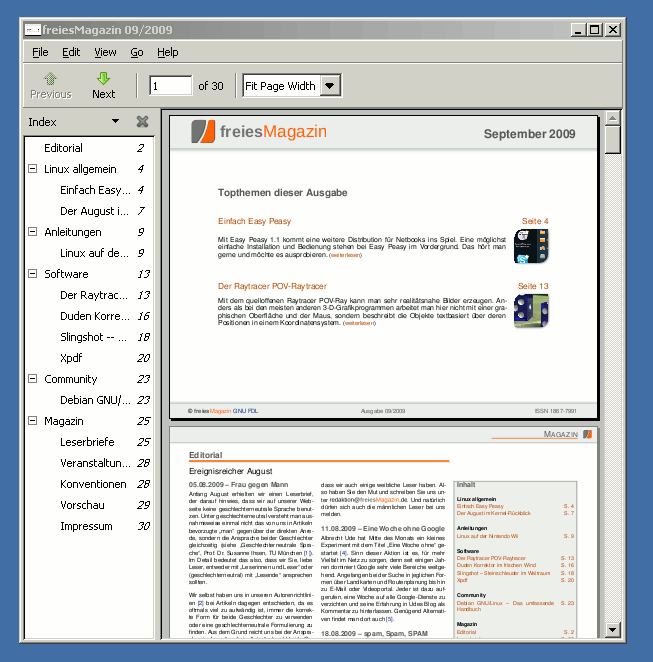
Die Welt der freien PDF-Reader für Windows ist mit dem Release von GNOME 2.28 etwas größer geworden. Evince, der PDF-Reader der GNOME Desktopumgebung, wurde jetzt für Windows portiert. Evince lässt sich recht einfach auf Windows installieren. Auf live.gnome.org könnt Ihr eine .msi-Datei herunterladen, über die Ihr Evince für Windows via ein Installationsprogramm installieren könnt. Noch hackt der Installer etwas, so wurde bei mir kein Eintrag im Startmenü erzeugt, sondern nur ein Icon (ohne Bild) auf dem Desktop abgelegt. Das Programm selber funktioniert jedoch wunderbar. Endlich gibt es mal wieder ein bisschen frischen Wind bei den PDF-Readern für Windows. Fehlt nur noch eine portable Version 🙂




Danke für den Hinweis. Ich habe schon neulich nach der Windowsversion gesucht, als ich das in den Änderungen zu GNOME 2.28 las. Die fsfe hat noch eine schöne Liste freier verfügbarer pdfreader als Alternative zum üblichen Acrobatreader link.
Ich hätte es gern als Portable App gesehen .
Immerhin endlich ein ganz freier PDF Reader für Win.
Braucht es denn GTK wie Pidgin für Win?
Hi tobias, ja Evince für Windows als portable Anwendung wäre genial. Ich würde aber Gift darauf nehmen, dass das noch kommt.
Hi PhotonX, nein du musst nichts extra installieren.
Auf welchem Windows soll es denn laufen (XP, Vista)? Könnte für meine Frau interessant sein.
Der Screenshot, den du im Artikel siehst, stammt von Windows XP. Ich denke, dass Evince auf jeder Windows-Version laufen wird.
Neues auf #LinuxUndIch: Freier #PDF Reader #Evince für #Windows http://linuxundich.de/de/ubuntu/evince-2… #GNOME
RT @ChrisZwitschert: Neues auf #LinuxUndIch: Freier #PDF Reader #Evince für #Windows http://linuxundich.de/de/ubuntu/evince-2… #GNOME
Ich nehme nur noch SumatraPDF