
Installiert man Windows XP SP2 in einer virtuellen Maschine in VMware von einer Windows-CD, so stolpert man eventuell über die Fehlermeldung Error: Installation Failed: D:\ENGLISH\WINXP\PRO_WITH_SP2\I386\asms. Error Message: The parameter is incorrect, dir mir ein paar Kopfschmerzen bereitet hat…
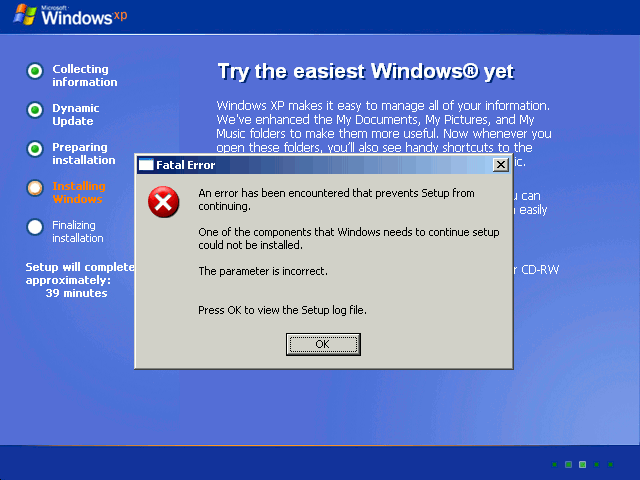
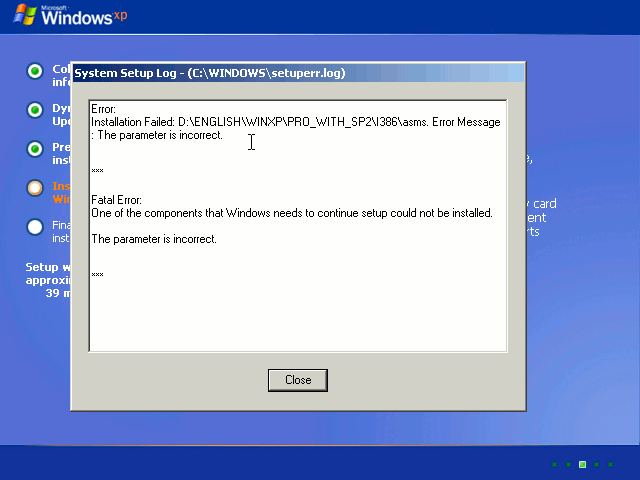
Die virtuelle Maschine wird daraufhin neu gestartet und man landet wieder vor der sehr aussagekräftigen Fehlermeldung:
Error:
Installation Failed: D:\ENGLISH\WINXP\PRO_WITH_SP2\I386\asms. Error Message:
The parameter is incorrect

Fatal Error:
One of the components that Windows needs to continue setup could not be installed

The parameter is incorrect
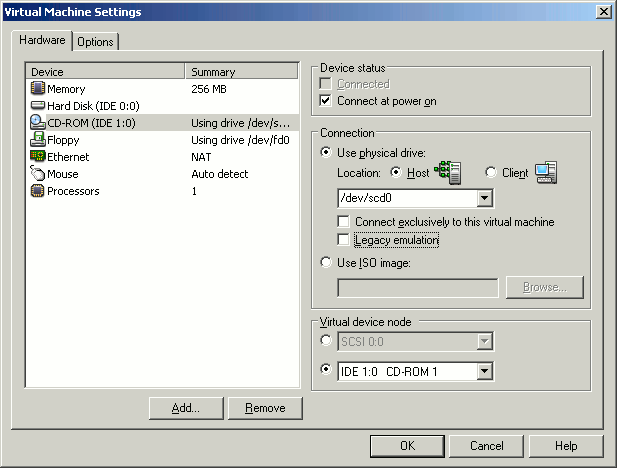
Trotz längerer Recherche, bin ich eher durch Zufall über die Lösung gestolpert. Das Problem lässt sich in den Einstellungen der virtuellen Maschine lösen. Hier ist als Standard die „Legacy Emulation“ aktiviert. Deaktiviert man diese, so bootet die die VM ordentlich und Windows lässt sich installieren.






Hey, versuch es doch mal mit Microsoft Virtual PC 2007 (Software ist kostenlos). Ich hatte dabei keinerlei Probleme. Rennt in einem durch. mfg
Ne, lieber nicht. VMware Server besitzt – wie der Name schon sagt – eine Server/Client-Struktur. Das heißt: Der VMware Server läuft auf dem performanten RechnerA auf den ich dann über relativ schwache Client-Rechner mittels der VMware Console zugreifen kann. Das bietet VirtualPC nicht. Des weiteren, Microsoft Virtual PC 2007 wird wohl kaum auf nem Linux Server laufen 😉