
Für ein kleines Interview musste ich heute ein über den Rechner geführtes Skype-Gespräch aufnehmen. Nach ein bisschen Googeln bin ich auf den Skype Call Recorder gestoßen. Das Programm gibt es bislang nur für Linux und es steht unter der GPL. Ihr könnt es für zahlreiche Ubuntu-Versionen als Paket herunterladen. Für Ubuntu oder Debian steht auch eine Paketquelle bereit. Leider sind die Pakete dort nicht signiert, von daher würde ich lieber die DEB-Dateien von Hand installieren.
Nach der Installation könnt Ihr das Programm über Anwendungen | Zubehör | Skype Call Recorder aus eurer Desktopumgebung heraus aufrufen. Läuft gerade Skype, so wird Euch Skype fragen, ob das Programm Zugriff auf die Anwendung haben darf. Damit der Rekorder funktionieren kann, müsst Ihr die Frage natürlich akzeptieren. In den Einstellungen von Skype könnt ihr die Zugriffserlaubnis später auch wieder deaktivieren.
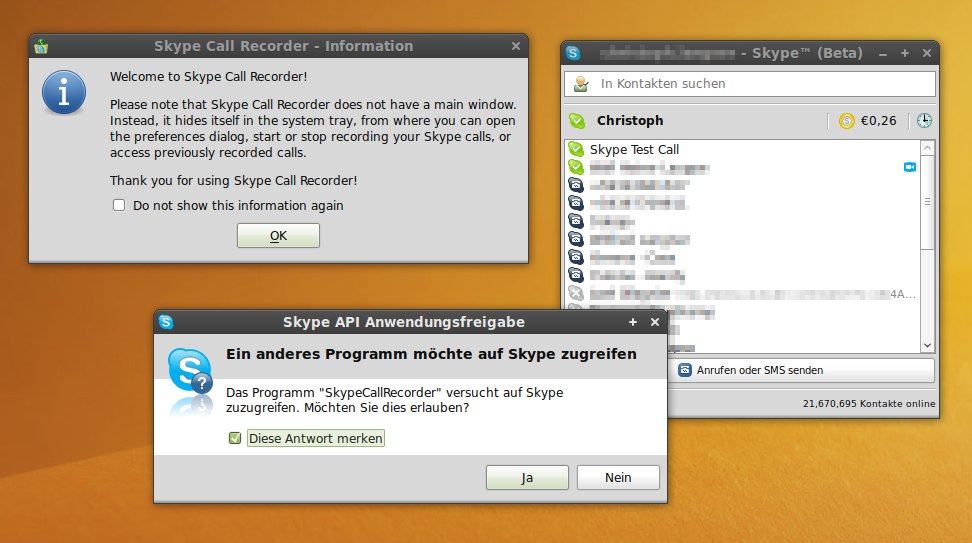
Danach nistet sich der Skype Call Recorder im Benachrichtigungsfeld ein und wartet auf einen Skype-Anruf, eine richtige Oberfläche hat das Programm nicht. Viele Einstellungen oder Optionen zum Ändern der Konfiguration gibt es auch nicht. Sobald ein Anruf eintrifft, fragt der Rekorder, ob der Anruf aufgenommen werden soll. Akzeptiert man die Aufnahme, dann landet diese in der Voreinstellung als gewöhnliche MP3-Datei im Verzeichnis ~/Skype Calls.
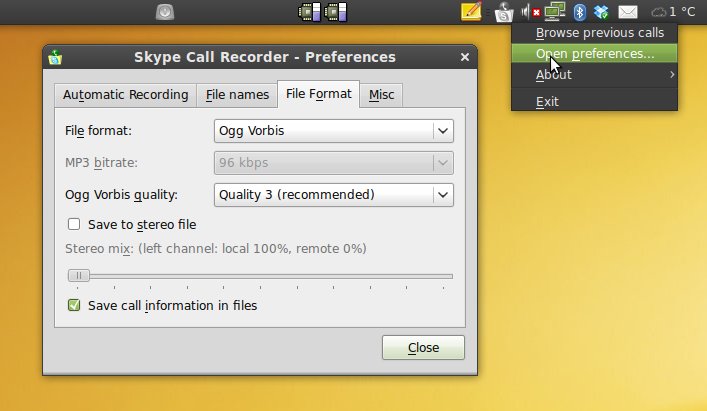
Über einen Rechtsklick auf das Icon des Skype Call Recorders kommt ihr in die Einstellungen des Programms. Hier könnt Ihr Regeln festlegen, ob die Aufnahme für bestimmte Anrufer automatisch gestartet werden soll, den Speicherort der MP3-Datei abändern oder auch das Aufnahmeformat euren Wünschen anpassen. Bei meinen Versuchen Skype-Gespräche aufzuzeichnen hat sich als Format Ogg Vorbis in Quality 3 und Mono als Audioformat bewährt.
Der Skype Call Recorder weißt Euch bei jeder neuen Aufnahme eines Gesprächs darauf hin, dass Ihr euren Gesprächspartner über die Aufnahme informieren müsst. Legal sind unangekündigte Tonaufzeichnungen von Telefonaten (und dazu gehören auch Skype-Telefonate) nämlich nicht. Also nicht einfach jedes Gespräch mitschneiden, das dürfen nur die Schlapphüte der Geheimdienste NSA oder des BND. 😉


Ich nutze den Skype Recorder auch und bin sehr zufrieden. +1 dafür, dass es den nur für linux gibt:-)
Ja, sehr schönes Tool. Habe SCR auch vor ein paar Tagen installiert. Man muss anfangs etwas an den Audio-Einstellungen schrauben, damit die Qualität passt. Vermutlich liegt auch einiges daran, dass ich kein Headset verwendet habe.
Super! Habe das direkt mal installiert (Arch Linux), funktioniert einwandfrei. Ist jetzt nicht so, dass es essentiell für mich wäre, aber ich installier gerne Sachen, die man auf jeden Fall irgendwann einmal braucht ^^
Funktioniert unter ubuntu 10.04 wunderbar.