
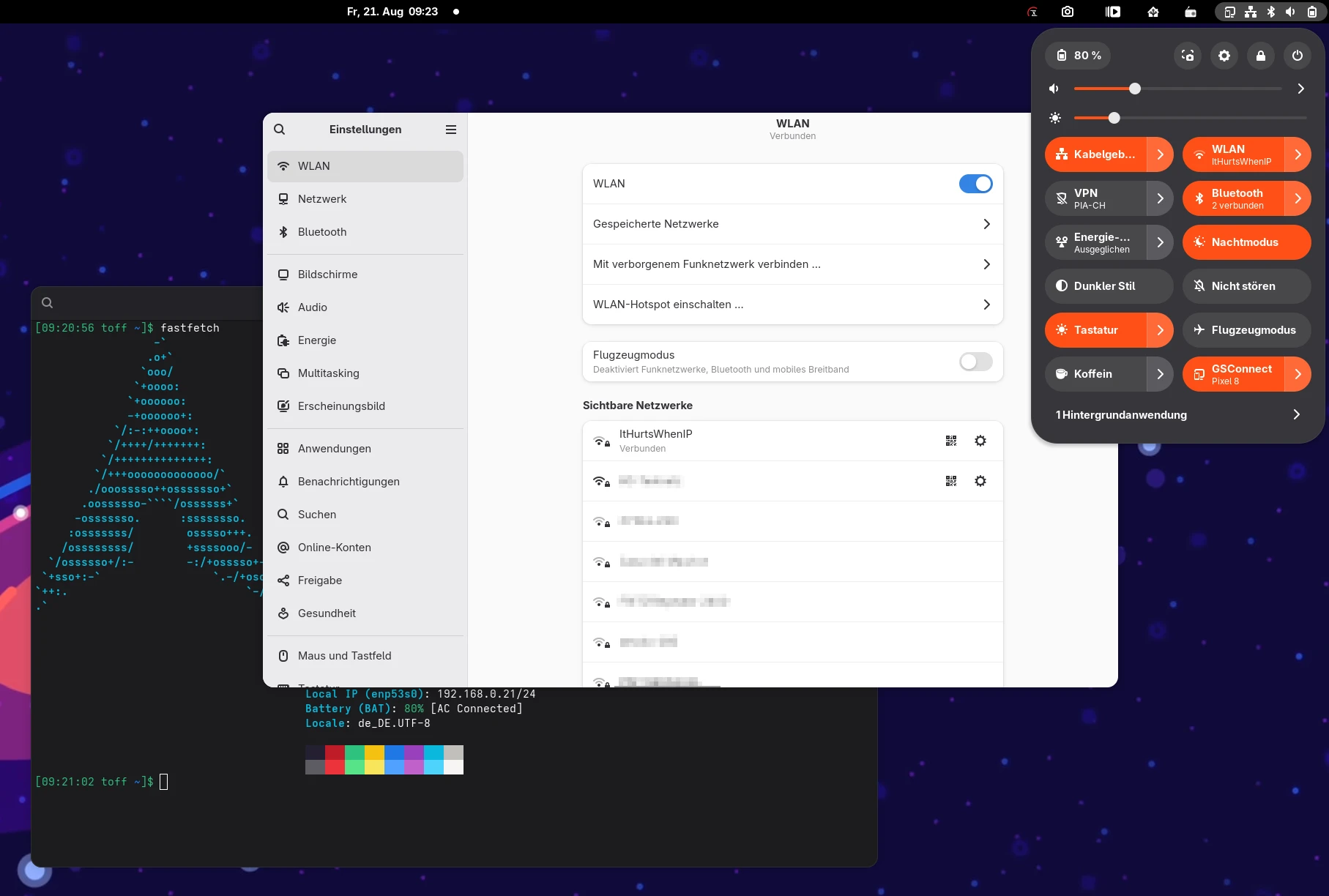
You may know the situation: at home you have a NAS or a cloud storage that you mount via Samba or WebDAV. But only when you are actually on your home network. Nobody wants to sit in a café waiting because the laptop is desperately trying to mount a share that is simply not reachable right now.
The obvious solution: /etc/fstab plus a dispatcher script for NetworkManager that mounts automatically based on the SSID or on whether the server is reachable. Sounds like an evening project. It isn’t quite. I tripped over three pitfalls that you only notice when the machine shuts down, wakes up, or is supposed to go into standby. Those are the three I’ll walk you through here.
I tested all of this on Arch Linux, but the setup is not Arch-specific. As long as your distro ships systemd and NetworkManager (so Fedora, Ubuntu, Debian or openSUSE, for example), everything here works one to one.
The basic setup
Network shares traditionally get noauto in the fstab, so they are not mounted immediately at boot but only when needed:
//server/home /mnt/server/home cifs credentials=/etc/samba/server.credentials,rw,uid=1000,gid=100,noauto,_netdev 0 0
//server/data /mnt/server/data cifs credentials=/etc/samba/server.credentials,rw,uid=1000,gid=100,noauto,_netdev 0 0
For the mount type itself, the Arch Wiki has good guides depending on the protocol, for example on Samba/CIFS and on davfs2 for WebDAV. Both work on any distribution, as long as cifs-utils or davfs2 are installed.
The actual mounting is then handled by a script in /etc/NetworkManager/dispatcher.d/. NetworkManager calls such scripts on every connection change and passes along the interface and the status (up, down, pre-down and a few more). All the details are in the NetworkManager dispatcher man page. A simple script checks the active Wi-Fi SSID and mounts if it matches:
#!/bin/bash
IFACE="$1"
STATUS="$2"

case "$STATUS" in
    up)
        SSID=$(nmcli -t -f active,ssid dev wifi | awk -F: '$1 == "yes" {print $2; exit}')
        if [[ "$SSID" == "MeinHeimnetz" ]]; then
            mount /mnt/server/home
            mount /mnt/server/data
        fi
        ;;
    down)
        umount /mnt/server/home
        umount /mnt/server/data
        ;;
esac
Done, right? Not quite. As soon as you shut down the system, wake it from standby or put it into standby, it turns out that this approach has its catches.
Why not just use GVfs?
You may now be wondering why I put myself through fstab and dispatcher scripts at all. GNOME offers “Connect to Server” in the file manager, which is a much easier way to mount network shares via SMB or WebDAV. That is exactly where my problem lies.
Such mounts don’t go through the kernel but through GVfs, GNOME’s virtual file system. Programs that use the GIO library (almost all GTK apps, first and foremost the file manager itself) talk to shares directly through their own URIs like smb:// or dav://, and accordingly display thumbnails and metadata correctly. For programs that can’t do that, GVfs additionally exposes the share as a perfectly normal path under /run/user/<uid>/gvfs. This bridge does run through FUSE. GVfs itself is not a classic FUSE file system but its own architecture with a daemon process per protocol, yet for exactly this case it provides a POSIX-compatible path via gvfsd-fuse.
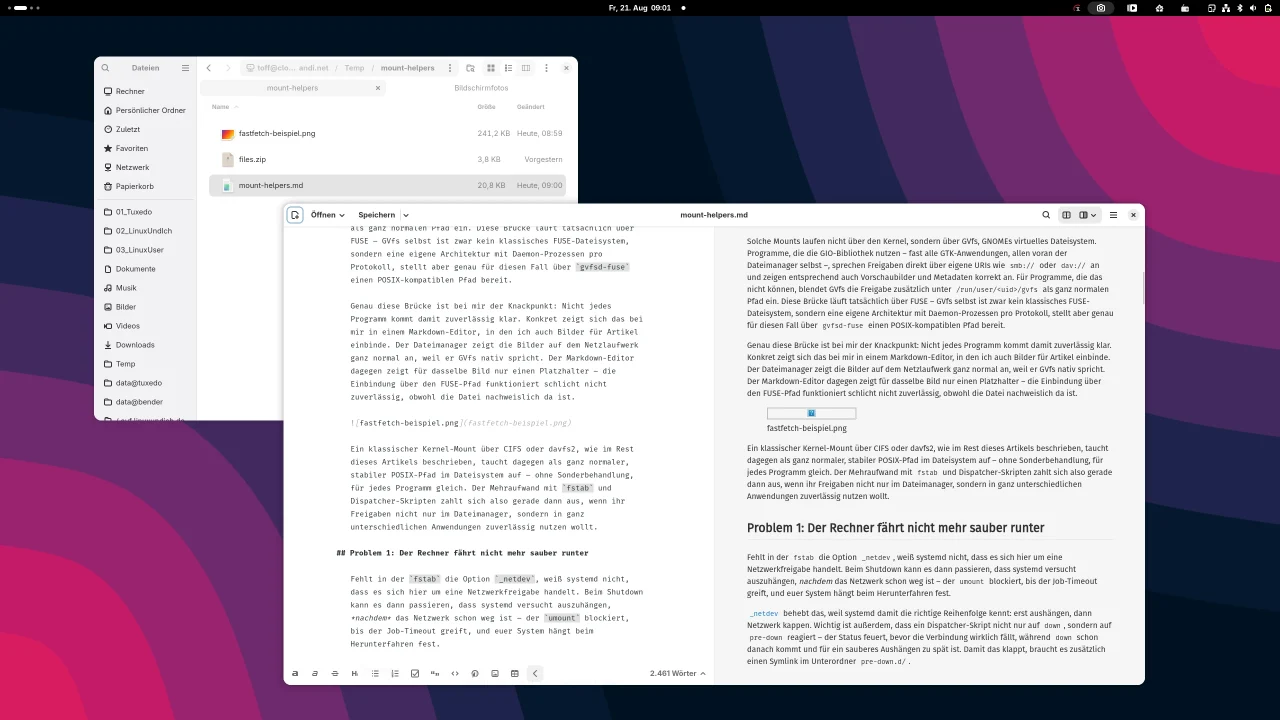
This very bridge is the sticking point for me: not every program copes with it reliably. In my case it shows up in a Markdown editor where I also embed images for articles. The file manager displays the images on the network drive just fine, because it speaks GVfs natively. The Markdown editor, on the other hand, shows only a placeholder for the same image. Access via the FUSE path simply doesn’t work reliably, even though the file is demonstrably there.
A classic kernel mount via CIFS or davfs2, as described in the rest of this article, shows up as a perfectly normal, stable POSIX path in the file system, with no special treatment and the same for every program. So the extra effort with fstab and dispatcher scripts pays off precisely when you want to use shares reliably not just in the file manager but in all kinds of apps.
Problem 1: The computer doesn’t shut down cleanly anymore
If the fstab lacks the option _netdev, systemd doesn’t know that this is a network share. On shutdown, systemd may then try to unmount after the network is already gone. The umount blocks until the job timeout kicks in, and your system hangs on shutdown.
_netdev fixes that, because systemd then knows the right order: unmount first, then cut the network. It is also important that a dispatcher script reacts not just to down but to pre-down. That status fires before the connection actually drops, while down comes afterward and is too late for a clean unmount. For this to work, you additionally need a symlink in the subfolder pre-down.d/.
Problem 2: The file manager freezes after waking up
A mount call for CIFS or WebDAV runs in the kernel and can block for quite a while if the server is unreachable, especially right after waking up, when DNS or routing aren’t fully back yet. By default, NetworkManager waits synchronously until such a dispatcher script has finished before it carries on. If the mount call hangs, suddenly your file manager or the network indicator hangs too, because they depend on the connection state.
The fix: just run the mount attempts in the background, so the dispatcher script itself returns immediately, no matter how long the actual mount takes.
run_async() {
    ( "$@" ) &>/dev/null &
    disown
}
Problem 3: Suspend suddenly stops working
And this is where it gets interesting. With the fix from problem 2 you stumble into a new and much nastier problem, which in my case looked like this: the screen turns off, but the keyboard backlight and LEDs stay on, and you have to force a hard power-off. What happened?
The mount syscall for CIFS or davfs blocks with an unreachable server in the so-called D state (uninterruptible sleep), a state that no signal can interrupt, not even SIGKILL. Before the kernel actually goes to sleep, it tries to freeze all processes. A process in D state can’t be frozen, so the whole suspend hangs until the network operation in the kernel gives up on its own, which can easily take a few minutes.
Because the mount attempts from problem 2 now keep running in the background for longer, the chance also goes up that such a blocking connection attempt is active at exactly the moment you want to suspend.
The reliable way out: before every mount, first check with a real userspace connection test whether the server is reachable at all. That kind of test can actually be aborted with a timeout, for example via Bash’s built-in /dev/tcp:
tcp_reachable() {
    local HOST="$1"
    local PORT="$2"
    local TIMEOUT_SECONDS="${3:-2}"
    timeout "${TIMEOUT_SECONDS}s" bash -c "echo >/dev/tcp/${HOST}/${PORT}" &>/dev/null
}
Only if the test succeeds does the actual mount follow. That way you almost never end up in the risky, blocking kernel connect, because by then you already know the server is there.
The combination that works for me
In the end, a robust setup needs four ingredients:
- _netdev in the fstab, so systemd classifies network shares correctly on shutdown.
- pre-down handling plus a symlink in pre-down.d/, so the unmount is guaranteed to happen before the connection is torn down, with a timeout and lazy unmount as a backup in case the normal umount acts up.
- Asynchronous mounts on up, so NetworkManager and everything that depends on it doesn’t block.
- A reachability test before every mount, so the actual, potentially blocking kernel connect never happens in the first place.
On top of that, a small health check via a systemd timer that looks a few minutes after boot and regularly afterward to see whether the shares are really there, and nudges things along if needed. Handy in case the triggering network event comes too early or too late.
All files at a glance
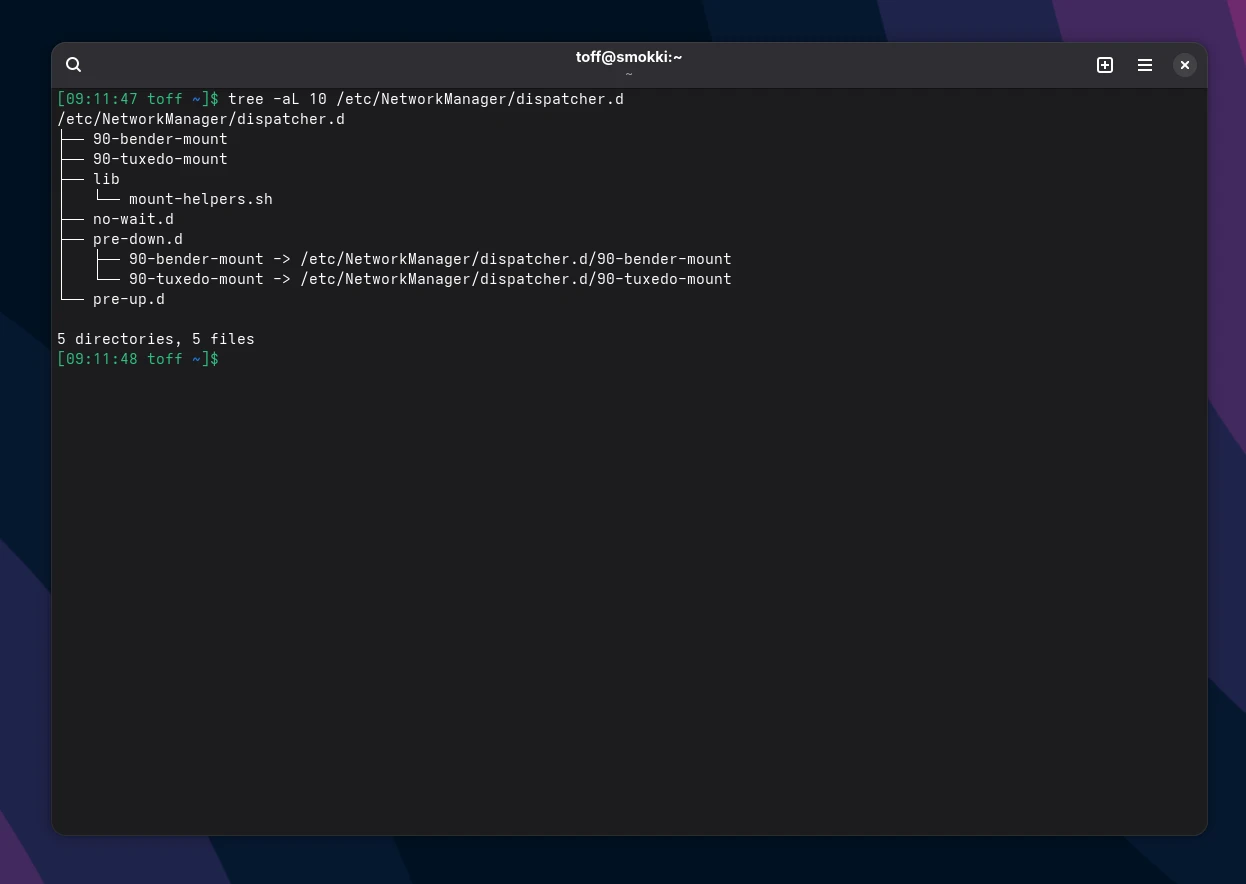
So you can rebuild all of this right away, here is the complete set of files. I replaced the example names from my own setup (a Samba server called bender, WebDAV via tuxedo) with generic placeholders. You’ll of course have to adapt them to your own environment.
/etc/fstab: the two shares, one Samba, one WebDAV:
//server/home /mnt/server/home cifs credentials=/etc/samba/server.credentials,rw,uid=1000,gid=100,noauto,_netdev,x-systemd.mount-timeout=15s,soft 0 0
//server/data /mnt/server/data cifs credentials=/etc/samba/server.credentials,rw,uid=1000,gid=100,noauto,_netdev,x-systemd.mount-timeout=15s,soft 0 0
https://cloud.example.com/remote.php/dav/files/user /mnt/webdav davfs noauto,_netdev,uid=1000,gid=100,x-systemd.automount,x-systemd.idle-timeout=300,x-systemd.mount-timeout=15s 0 0
The fstab only references the credentials; they are stored in separate files, if only so the password doesn’t sit in plain text in a file that everyone can read.
/etc/samba/server.credentials: credentials for the Samba share:
username=maxmuster
password=GeheimesPasswort123/etc/davfs2/secrets: credentials for the WebDAV share. Here the mount point is referenced instead of an option in the fstab:
/mnt/webdav maxmuster GeheimesPasswort123Both files belong to root and must not be readable by anyone else:
$ sudo chmod 600 /etc/samba/server.credentials /etc/davfs2/secrets
$ sudo chown root:root /etc/samba/server.credentials /etc/davfs2/secrets/etc/NetworkManager/dispatcher.d/lib/mount-helpers.sh: the shared library that all the other scripts source:
#!/bin/bash
log() {
[[ "$DEBUG" == "1" ]] && logger -t "$LOG_TAG" -- "$1"
}
run_async() {
( "$@" ) &>/dev/null &
disown
}
tcp_reachable() {
local HOST="$1"
local PORT="$2"
local TIMEOUT_SECONDS="${3:-2}"
timeout "${TIMEOUT_SECONDS}s" bash -c "echo >/dev/tcp/${HOST}/${PORT}" &>/dev/null
}
mount_with_retry() {
local MOUNT="$1"
local MAX_ATTEMPTS="${2:-3}"
local SLEEP_SECONDS="${3:-2}"
local MOUNT_TIMEOUT="${4:-10}"
if mountpoint -q "$MOUNT"; then
log "$MOUNT ist bereits eingehängt"
return 0
fi
log "Hänge $MOUNT ein"
local OUT ATTEMPT
for ((ATTEMPT = 1; ATTEMPT <= MAX_ATTEMPTS; ATTEMPT++)); do
if OUT=$(timeout "${MOUNT_TIMEOUT}s" mount "$MOUNT" 2>&1); then
log "$MOUNT erfolgreich eingehängt"
return 0
fi
log "Versuch $ATTEMPT/$MAX_ATTEMPTS für $MOUNT fehlgeschlagen (evtl. Timeout nach ${MOUNT_TIMEOUT}s): $OUT"
[[ "$ATTEMPT" -lt "$MAX_ATTEMPTS" ]] && sleep "$SLEEP_SECONDS"
done
log "Alle Versuche für $MOUNT fehlgeschlagen"
return 1
}
umount_with_fallback() {
local MOUNT="$1"
local TIMEOUT_SECONDS="${2:-5}"
if ! mountpoint -q "$MOUNT"; then
log "$MOUNT ist nicht eingehängt"
return 0
fi
log "Hänge $MOUNT aus"
if timeout "${TIMEOUT_SECONDS}s" umount "$MOUNT"; then
log "$MOUNT erfolgreich ausgehängt"
return 0
fi
log "Normaler Unmount von $MOUNT fehlgeschlagen, versuche Lazy Unmount"
if umount -l "$MOUNT"; then
log "$MOUNT per Lazy Unmount ausgehängt"
return 0
fi
log "$MOUNT konnte nicht ausgehängt werden"
return 1
}/etc/NetworkManager/dispatcher.d/90-server-mount: Samba share, bound to a specific Wi-Fi SSID or to the wired network:
#!/bin/bash

DEBUG=1
LOG_TAG="server-mount"

LIB="/etc/NetworkManager/dispatcher.d/lib/mount-helpers.sh"
if [[ -r "$LIB" ]]; then
    source "$LIB"
else
    logger -t "$LOG_TAG" -- "Bibliothek $LIB nicht gefunden, breche ab"
    exit 1
fi

IFACE="$1"
STATUS="$2"

MOUNTS=(
    "/mnt/server/home"
    "/mnt/server/data"
)

mount_server() {
    if ! tcp_reachable server 445 2; then
        log "server auf Port 445 nicht erreichbar, überspringe Mount-Versuch"
        return 1
    fi

    for MOUNT in "${MOUNTS[@]}"; do
        mount_with_retry "$MOUNT" 3 2 10
    done
}

umount_server() {
    for MOUNT in "${MOUNTS[@]}"; do
        umount_with_fallback "$MOUNT" 5
    done
}

log "Dispatcher gestartet: Interface=$IFACE, Status=$STATUS"

case "$STATUS" in
    up)
        if [[ "$IFACE" == wl* ]]; then
            SSID=$(nmcli -t -f active,ssid dev wifi |
                awk -F: '$1 == "yes" {print $2; exit}')

            log "Aktive WLAN-SSID: $SSID"

            if [[ "$SSID" == "MeinHeimnetz" ]]; then
                run_async mount_server
            fi

        elif [[ "$IFACE" == enp* || "$IFACE" == eth* ]]; then
            run_async mount_server
        fi
        ;;

    pre-down|vpn-pre-down)
        log "Netzwerkverbindung wird beendet – Mounts aushängen"
        umount_server
        ;;
esac

log "Dispatcher beendet"
exit 0/etc/NetworkManager/dispatcher.d/90-webdav-mount: WebDAV share, which simply requires a reachable cloud server:
#!/bin/bash

DEBUG=1
LOG_TAG="webdav-mount"

LIB="/etc/NetworkManager/dispatcher.d/lib/mount-helpers.sh"
if [[ -r "$LIB" ]]; then
    source "$LIB"
else
    logger -t "$LOG_TAG" -- "Bibliothek $LIB nicht gefunden, breche ab"
    exit 1
fi

IFACE="$1"
STATUS="$2"

MOUNTPOINT="/mnt/webdav"
HOST="cloud.example.com"

mount_webdav() {
    if ! tcp_reachable "$HOST" 443 3; then
        log "$HOST auf Port 443 nicht erreichbar, überspringe Mount-Versuch"
        return 1
    fi

    mount_with_retry "$MOUNTPOINT" 3 2 10
}

log "Dispatcher gestartet: Interface=$IFACE, Status=$STATUS"

case "$STATUS" in
    up)
        run_async mount_webdav
        ;;

    pre-down|vpn-pre-down)
        log "Netzwerkverbindung wird beendet – Mount aushängen"
        umount_with_fallback "$MOUNTPOINT" 5
        ;;
esac

log "Dispatcher beendet"
exit 0
For both scripts you also need the matching symlinks, so that pre-down is guaranteed to fire before the connection is torn down:
$ sudo ln -s /etc/NetworkManager/dispatcher.d/90-server-mount
             /etc/NetworkManager/dispatcher.d/pre-down.d/90-server-mount
$ sudo ln -s /etc/NetworkManager/dispatcher.d/90-webdav-mount
/etc/NetworkManager/dispatcher.d/pre-down.d/90-webdav-mount/usr/local/bin/mount-healthcheck.sh: the safety net that checks regularly:
#!/bin/bash
DEBUG=1
LOG_TAG="mount-healthcheck"

LIB="/etc/NetworkManager/dispatcher.d/lib/mount-helpers.sh"
if [[ -r "$LIB" ]]; then
    source "$LIB"
else
    logger -t "$LOG_TAG" -- "Bibliothek $LIB nicht gefunden, breche ab"
    exit 1
fi

log "Healthcheck gestartet"

SSID=$(nmcli -t -f active,ssid dev wifi 2>/dev/null |
    awk -F: '$1 == "yes" {print $2; exit}')

if [[ "$SSID" == "MeinHeimnetz" ]] || ping -c 1 -W 1 server >/dev/null 2>&1; then
    mount_with_retry "/mnt/server/home" 2 3
    mount_with_retry "/mnt/server/data" 2 3
else
    log "server im aktuellen Netz nicht erreichbar, überspringe"
fi

mount_with_retry "/mnt/webdav" 2 3

log "Healthcheck beendet"
exit 0
/etc/systemd/system/mount-healthcheck.service and mount-healthcheck.timer: systemd units that trigger the health check script 60 seconds after boot and every 10 minutes after that:
[Unit]
Description=Prueft und stellt Netzwerk-Mounts sicher
After=network-online.target
Wants=network-online.target

[Service]
Type=oneshot
TimeoutStartSec=120
ExecStart=/usr/local/bin/mount-healthcheck.sh
[Unit]
Description=Fuehrt den Mount-Healthcheck 60s nach Boot und danach alle 10 Minuten aus
[Timer]
OnBootSec=60s
OnUnitActiveSec=10min
AccuracySec=30s
[Install]
WantedBy=timers.targetDon’t forget to enable it:
$ sudo systemctl daemon-reload
$ sudo systemctl enable --now mount-healthcheck.timer/usr/lib/systemd/system-sleep/90-cancel-network-mounts: an optional safety net before suspend:
#!/bin/bash
case "$1/$2" in
    pre/*)
        logger -t sleep-mount-guard "Breche evtl. laufende Netzwerk-Mount-Versuche vor Suspend ab"
        pkill -9 -f 'mount.cifs' 2>/dev/null
        pkill -9 -f 'mount.davfs' 2>/dev/null
        ;;
esac

exit 0
All scripts have to be executable:
$ sudo chmod +x /etc/NetworkManager/dispatcher.d/lib/mount-helpers.sh
              /etc/NetworkManager/dispatcher.d/90-server-mount
              /etc/NetworkManager/dispatcher.d/90-webdav-mount
              /usr/local/bin/mount-healthcheck.sh
              /usr/lib/systemd/system-sleep/90-cancel-network-mounts
Long story short
Automatically mounting network shares via NetworkManager works well, but it is not a five-minute job, as the docs might make you think. If you just put the mount command into an up script, sooner or later one of the three problems will catch up with you, usually exactly when you’re on the road and have no log at hand.
With _netdev, correct pre-down timing, asynchronous execution and a real reachability test before every mount, you’re on the safe side. And the pattern carries over one to one to other network-dependent automations, such as VPN connections or backup jobs that should only run on the right network.

Leave a Reply