
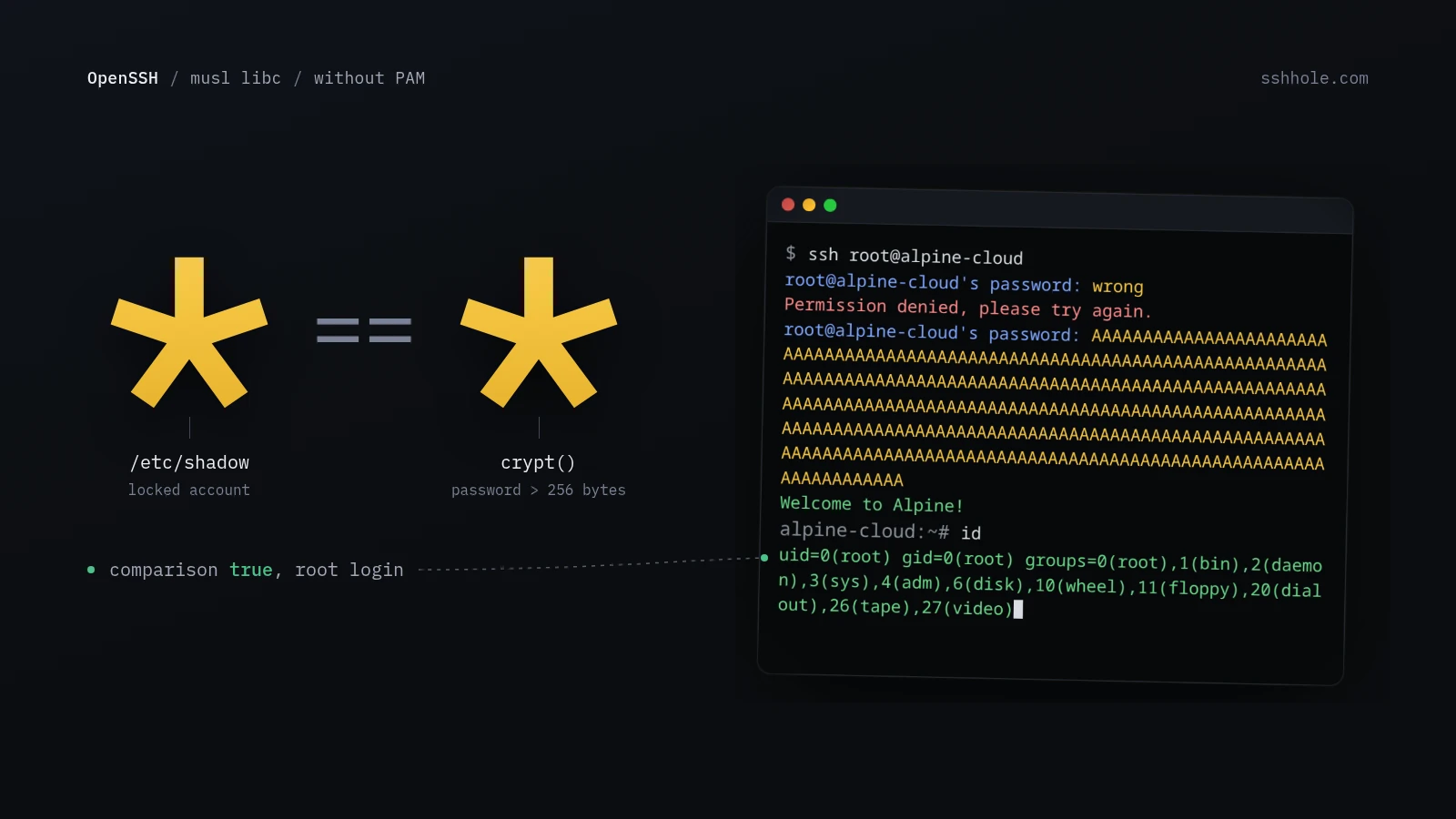
For decades we have all been hearing the same sermon: short passwords are a security problem. Use a long passphrase instead, ideally with special characters, ideally from a password manager. As of today, we know that long passwords are a problem too. At least when they are longer than 256 bytes and hit an OpenSSH server running without PAM on musl libc. Because then every password is the right one.
An asterisk is an asterisk
The vulnerability goes by the lovely name *sshole and was found by Özgün Kültekin (Wakefield). Under the right conditions, an attacker can log in via SSH with any password between 257 and 1024 bytes. And of all accounts, it works on the ones that are actually locked and are not supposed to have a password at all. That can include root.
The cause is almost comical. Instead of a password hash, locked accounts often just have a * in /etc/shadow. musl’s crypt() function also returns a * when something goes wrong while processing the password. And that is exactly what happens with passwords over 256 bytes. OpenSSH then compares asterisk with asterisk, finds them equal, and politely waves the visitor through.
This was not caused by a single blunder, but by several changes that were harmless on their own. In 2012, musl introduced both the return value on failure and the length limit. In 2016, OpenSSH plugged a timing leak and, in doing so, made sure the bug also reaches real users with *. Nobody noticed for about ten years.
All clear for the Linux desktop
If you run sshd on your Arch machine, your Ubuntu laptop or your little Debian home server, you can sit back and relax. The big distributions use glibc instead of musl and have OpenSSH check passwords through PAM in their default configuration. So the path to the asterisk comparison is never open in the first place. According to the analysis, Debian, Ubuntu and Fedora are not affected, and neither are OpenBSD and Dropbear.
Only systems where all of these points come together are affected:
- Linux with musl libc (such as Alpine Linux, OpenWrt, Buildroot or Yocto)
- OpenSSH without PAM
- password authentication enabled
- at least one account with
*as the password field in/etc/shadow - at least one other account with a valid password hash
It gets creepy where nobody is looking
On paper, the list sounds like a niche. On Alpine Linux, however, it is the default: the openssh-server package works without PAM there, password logins are on, and root has had a * as its hash since Alpine 3.16. On top of that, the official images for AWS and Azure come with a user named alpine that becomes root via doas without a password. One long password, one doas, done.
OpenWrt itself ships with Dropbear as its SSH server, which is not affected. But if you switched your router to OpenSSH, say for SFTP, you should take a closer look. It gets really unpleasant with Buildroot and Yocto. Manufacturers use them to build firmware for routers, NAS boxes, cameras, industrial controllers and all kinds of IoT stuff. Very few data sheets tell you what exactly is inside.
And these are exactly the boxes that like to sit directly on the internet. They are the devices you set up once and never touch again, because they just work. Updates come, if at all, only when the manufacturer remembers that it once sold the thing. In my opinion, that is the real creepy part of this vulnerability, not the Linux desktop.
What you should do now
OpenSSH released version 10.6p2 today, which catches the problem on the OpenSSH side. On Alpine Linux, you get the update through the package manager as usual with apk upgrade openssh. Other distributions fix the bug with a backported security patch. Restart the SSH service afterwards so the new version is really the one listening. With off-the-shelf firmware, all you can do is look for an update from the manufacturer.
If you cannot update right away, turn off password login in sshd_config:
PasswordAuthentication noBefore you do, make sure that key-based access works, of course, or you will lock yourself out. On Alpine, you can also do this as a separate configuration file and then restart the service:
echo "PasswordAuthentication no" > /etc/ssh/sshd_config.d/00-no-passwords.conf
rc-service sshd restart
Honestly: an SSH server with password login sitting wide open on the internet was not a good idea even before *sshole. Passwords that are too short get guessed, and as of today, the ones that are too long are suspicious as well. The best password for SSH is still none at all, it is a key. Do you run Alpine boxes or an OpenWrt router with OpenSSH, and do you actually know what SSH server your devices on the net are running?

Leave a Reply