
Paint.NET ist eine recht beliebte Bildbearbeitungssoftware für Windows. Irgendwo zwischen Adobe Photoshop/Gimp und MS Paint angesiedelt bietet Paint.NET recht leistungsfähige Bildbearbeitung für Einsteiger und Fortgeschrittene. Das Programm wurde mit Hilfe der .NET-Plattform realisiert, für das es in der Linux-Welt die Alternative Mono gibt. .NET-Programme lassen sich daher auf Linux portieren, wenn es jedoch auch mit etwas Aufwand verbunden ist. Vor zwei Jahren hat Miguel de Icaza bekannt gegeben, dass er Paint.NET auf Mono portiert hat, doch erst heute kann ich sagen, dass die Portierung funktioniert. Getestet habe ich Paint Mono mit Ubuntu „Jaunty Jackalope“…
Paint Mono kann man noch nicht einfach als Paket herunterladen und installieren. Man benötigt man eine Reihe von Pakete, um Paint Mono erzeugen zu können. Über…
$ sudo apt-get install mono-devel monodevelop mono-tools-gui mono-tools-devel subversion
…kann man diese installieren. Anschließen kann man sich über subversion den aktuellen Quellcode laden und diesen kompilieren und im System installieren…
$ svn co http://paint-mono.googlecode.com/svn/trunk/src paint-mono
$ cd paint-mono
$ ./configure
$ make
$ sudo make install
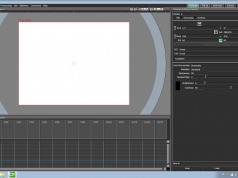
Dabei wird kein Eintrag in den Anwendungsmenüs erstellt. Das Programm lässt sich nur über den Befehl paintdotnet starten. Auf dem Desktop sieht dann Paint Mono so aus…
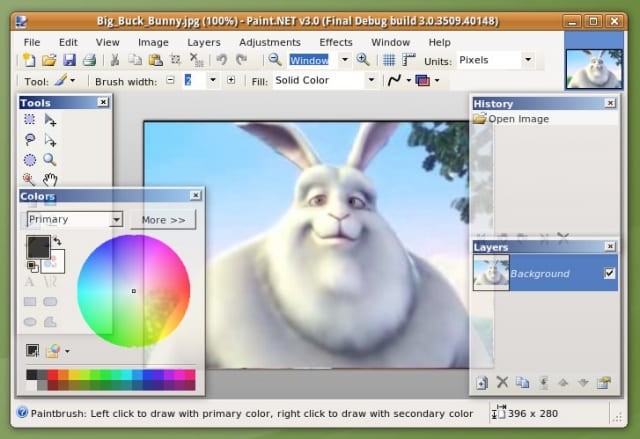
Lohnt sich der Aufwand? Definitiv nein, lasst euch nicht von dem ansprechenden Screenshot täuschen. Paint Mono ist SEHR langsam, brauchbar zeichnen lässt sich selbst auf leistungsstarken Rechner damit nicht. Des weiteren ist das Programm schlecht in die Desktopumgebung integriert, sieht somit hässlich aus (ein Screenshot gibt das nicht gut her) und hat Probleme mit manchen Themes. So ist die Schrift der Menüs oft weiß auf weißem Hinterngrund. Abstürze konnte ich auch des öfteren beobachten. Paint Mono eignet sich daher nicht wirklich zur Bildbearbeitung, sondern nur für Leute die wissen wollen ob die Portierung von Paint.NET auch klappt.




Zwei Jahre für eine Portierung von .NET auf Mono? Da hätte man das auch nativ für Mono neu programmieren können, mit besserem Ergebnis.
Ich dachte eigentlich, Mono soll die Portierung von .NET Programmen vereinfachen, aber wenn dass das Ergebnis ist dann ist das Projekt zumindest an dem Punkt gescheitert
Burli, das hast du ein bisschen falsch aufgegriffen. Ich habe bald zwei Jahre gebraucht, bis ich Paint Mono auf einem System mal zum Laufen gebracht habe 😉 Entweder war die vorhandene Mono Version zu alt, oder es gab gewisse Pakete nicht, oder oder 🙂
Das sieht aus wie ein Programm unter Wine auf dem Screenshot. Kann es sein, dass zwar C# aber ausschließlich mit Windows-Oberflächen-Komponenten gearbeitet wurde und hat nicht Microsoft diese patentiert? Ist Paint.Net damit nur was für Novell/Microsoft-Kunden?
Da ist ja ein Standard GTK+/Glib-Programm in C wie GIMP noch portabler…
Ja, ich denke. beim Compilieren braucht man eine Reihe von mono Bibliotheken, hat man die nicht bekommt man Fehlermeldungen wie „error CS0006: cannot find metadata file `System.Windows.Forms'“ Das deutet arg drauf hin, dass hier viel mit solchen Komponenten gearbeitet wurden.
Indeed, Windows.Forms ist eigentlich nur ein Nachbau der eigentlichen Funktionen für das Windows UI. Es wurde ja nachgebaut, um besser protieren zu können
Also bei mir läuft es unter OpenSuse 11.1 eigentlich mit einer recht annehmbaren Geschwindigkeit. Nur verhaspelt sich das Programm beim Vergrößern von Bildern …
Sogar ein per checkinstall erstelltes RPM ist möglich. 😀
Benutzung natürlich auf eigene Gefahr!
http://dl.getdropbox.com/u/1708464/paint-mono-1.i386.rpm
obi-wahn, hast du mal mit dem Pinsel gemalt? Aus einem mit der Maus gefahrenen Kreis wird bei mir eher ein Sechseck… Welche Mono-Version benutzt OpenSuse 11.1? Vielleicht bietet eine neuere Version eine bessere Performance.
Der Kreis sieht eigentlich ganz annehmbar aus, nur meine Hand zittert etwas. 😀
Ich habe die Version 2.4.2.1-15.1 (von mono-core) aus dem Buildservice.
Danke ein schönes Programm.
Tja, nach einem bisschen Recherche sieht es, glaube ich, relativ düster für Paint.Mono aus. Denn Paint.Net ist seit 2007 (?) Closed Source. Da müssen wohl Leute versucht haben Paint.Net als ihr eigenes Werk auszugeben: Hier. Allerdings wollen die Entwickler wohl Paint.Mono selbst vorantreiben: Hier
//EDIT Christoph: Das mit den Links hat wohl nicht geklappt, ich hab die html-Tags entfernt.
Paint Mono eignet sich daher nicht wirklich zur Bildbearbeitung, sondern nur für Leute die wissen wollen ob die Portierung von Paint.NET auch klappt…
Und für Leute, die mit dessen Bilddateiformat zu tun haben (BLOB in XML enkapsuliert, gruslig). Oder hat da wer ’nen Tip für mich, was das konvertieren kann (am besten unter BSD)?
Kann Paint.NET sein Format in .xcf oder .psd exportieren? Dann könntest du ja mit Gimp oder Photoshop weiterarbeiten.
Schade. Ich hatte gerade nach einer Alternative zu Paint.Net gesucht und bin auf diesen Artikel gestoßen. Ich finde es schlimm das es nichts vergleichbares zu der guten Windows Lösung gibt. Vielen Dank für den guten Artikel.
Schau dir mal Pinta an. Gerade ist die Version 0.2 rausgekommen, vielleicht ist das ja was für dich.
Hallo!
Pinta in Version 1.4 rausgekommen.
Die Pint 1.4 sind das letzte Mono for Windows, Gtk#, and XSP nicht enthalten.
Schade das Mono for Windows, Gtk#, and XSP nicht für alle aufgelisteten Betriebssysteme enthalten ist.
Gtk# for .NET
Jetzige Situation
Ubuntu
Pinta Maintainers PPA | Daily Builds PPA | HowTo: Installing Pinta
Tarball
Tarball
Download
Mac OS X
Mac OS X
Download | Mono for OS X (Required)
Windows
Windows
NOTE: Requires .Net 4.(Download)
Download | Gtk# for Windows (Required, restart after install)
Zip File
Zip File
Download
Source Code
Source Code (Github)
Pinta on GitHub
Dabei ist auf http://www.go-mono.com/mono-downloads/download.html das letzte Mono for Windows, Gtk#, and XSP enhalten.
Hallo!
Mono Develop hat dass Visual C# Redistributable Package 2005 anstatt dass Visual C# Redistributable Package 2010.
Mit freundlichen Grüssen!
A compile on Debian Wheezy returned an error:
/bin/sh: 1: gmcs: not found
After reading the comment on google code i used
apt-get install mono-gmcs mono-utils
and now it works!
(in the console it shows some X11 and general errors, but the app is usable)
Bei mir funktioniert dieses prog mit nomaler geschwindigkeit.
Läuft ziemlich gut, einfach wenn man zoomt, dann bugt das Bild. Dann muss man das Fenster minimieren und wieder aufmachen.
Benutze HP Notebook mit Ubuntu 13.10 64 Bit – Intel Core i3 – 5GB RAM – Intel HD Graphics 3000.
😉
Hallo!
Pinta 1.4 lässt sisch nicht installieren unter Windows mit mono-3.2.3-gtksharp-2.12.11-win32-0.exe.
Hallo!
Pinta 1.2 lässt sich installieren. Nur bei der letzten Version Pinta 1.4 ist der Mono Fehler vorhanden.
Hallo!
Pinta 1.1 Packages: erhältlich für alle Betriebssysteme.
Pinta 1.2 lässt sich installieren.
Noch viel ist zu korregieren in Pinta 1.4.
Auf der offizilliellen Monowebseite http://www.mono-project.com/Main_Page ist nicht einmal dieses Mono vorhanden.
Hallo ,wie bekomme ich paint mono wieder runter?
Danke Gruß an alle.